Services
Portfolio Pricing Book Service Areas About Journal Contact Book Now

Book a Flyover shoot

Packages first. Details second.

See exactly how the Spiro order screen works before you enter any account or property information. You can review every package without signing in.

Dragonwood property exterior surrounded by trees
No account needed to see pricingThe sign-in box is optional. Tap the gold See Pricing button when Spiro opens.

The short version

When Spiro opens, tap See Pricing.

Spiro sometimes places its sign-in panel first. You do not have to sign in to browse Flyover’s catalog or choose a package.

Tap See Pricing

Use the gold button on the right side of the sign-in screen. It closes the panel and opens the full catalog.

Select what you need

Choose a package, an individual service, commercial work, or short-term rental media.

Add the property

Spiro then asks for the listing details, add-ons, contact information, and appointment time.
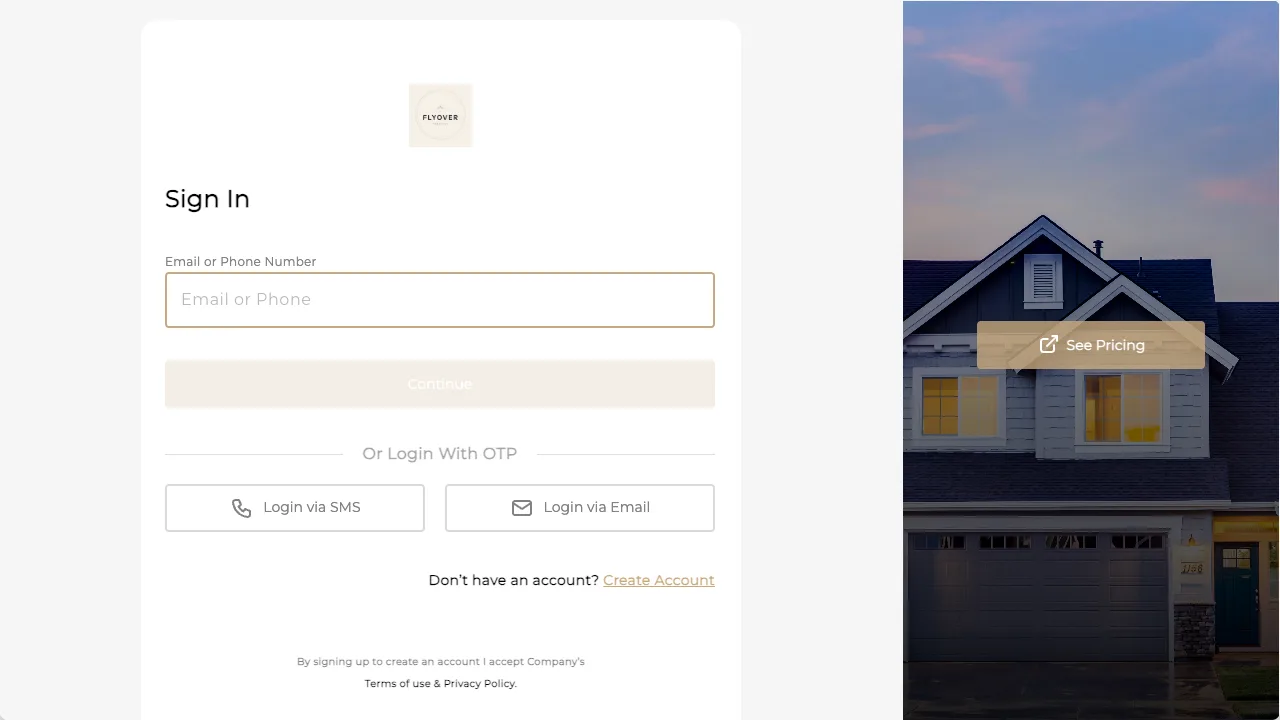
Spiro sign-in screen with the See Pricing button highlighted on the right
The gold See Pricing button is the quickest path. No login is required before package selection.

Package overview

Choose the coverage that fits the listing.

These are the starting package prices. Spiro shows the complete catalog, optional services, and final order details.

Strong essentials

Starter

From $399

  • Interior and exterior photography
  • Drone photography
  • Detailed floor plan
  • Branded and unbranded property website

Full production

Signature

From $999

  • Photography and aerial coverage
  • Detailed floor plan and property site
  • Cinematic listing film
  • Agent-led content and social edits

Ready when you are

Choose inside Spiro.

Here is exactly what to do on the next page:

  1. Tap See Pricing. It is the gold button on the right. No sign-in required.
  2. Choose your package or individual service.
  3. Enter the property details, choose a time, and submit the order.
Need help? (978) 735-8864First Flyover project? Request a complimentary shoot